

Perhaps the most-asked question about an RV campground is “How’s the Wi-Fi?”. In the good old days, people went RVing to get off the grid and get away from it all. These days things are way different, and folks don’t want to leave their city world behind, so they try to drag everything with them, but duct tape, as good as it is, is worthless to drag the internet along with you.
A lot of our modern lives depend on the internet. People remote-work on it. Email runs over it. Netflix and Disney+ won’t work without it. And Wi-Fi calling has extended the usefulness of our cell phones in lousy cell coverage areas. Many of the good RV camping applications have a handy table to tell you how good your cell coverage will be, and how reliable and robust the campground Wi-Fi is, but the values in these tables are crowd-sourced, and one man’s “Awesome!” is usually my “!@#%& this!”.
Fear not, my fellow road gypsies, a new age has dawned: affordable, fast, mobile satellite internet. For he shall bring you fountains of knowledge, and his name is STARLINK.
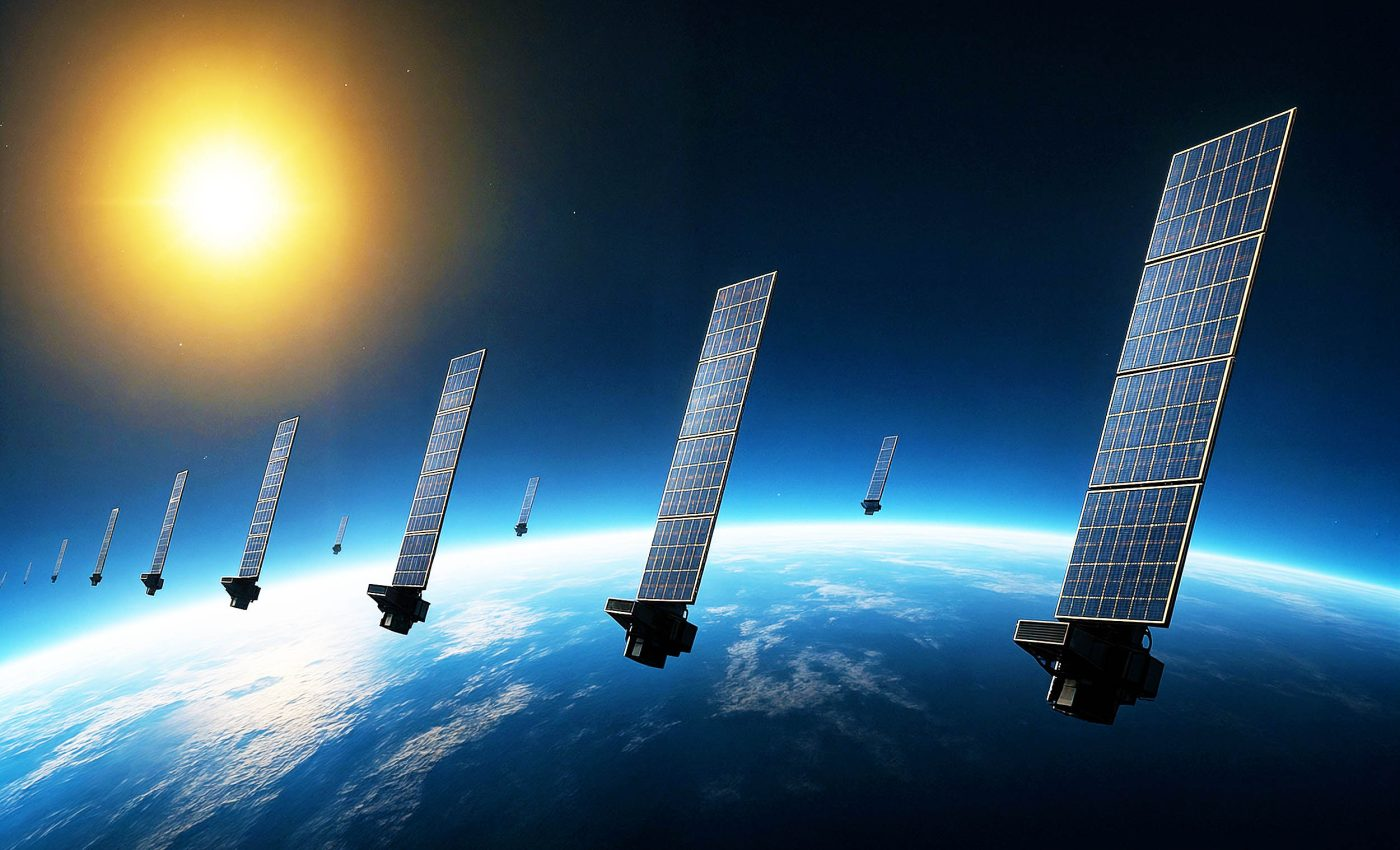
Starlink, for those of you who might not know, is a constellation of Low Earth Orbit (LEO) satellites (10,000 at last count) whose orbits give radio signal coverage to the entire surface of the planet, and these radio signals carry internet. You can see one of the “trains” of Starlink LEO satellites in the picture at the top of this post. It is the “always something overhead” nature of this constellation that gives you a constant signal as your access point automatically hops from one satellite to another. Laser links between the satellites route your signal down to earth-surface collectors that feed into the World Wide Web backbone network.
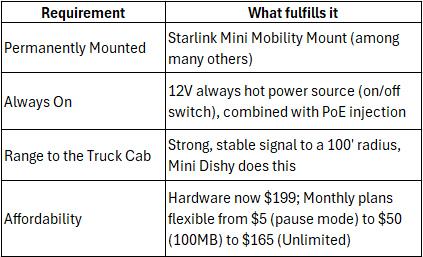
The latest generation is Starlink Mini, a mobile-ready system that can be operated anywhere you can give it 12V power and a view of the open sky. Backpackers use this system to take the internet with them, and to also enable Wi-Fi calling to their cell phones. And it works like a charm for RVers, even when you are on the open road. You can still see the last generation (non-mobile) systems all over RV campgrounds, their antennas set out in the open with a power line and ethernet cable trailing out to them from a rig. Alas, more than a few of the connecting cables, and occasionally an antenna, have fallen victim to vehicles, lawn mowing tractors or just outright theft. With the new mobile-ready Mini, the antenna/system can be roof installed permanently to eliminate both peril to it and any requirement for setup when you camp. It won’t be entirely obvious to anyone in a campground that we are enjoying high speed broadband internet throughout our entire campsite, and in the cab of the truck while towing, without a very close inspection. But it was really the affordable pricing that made it real for us: $199 for the system hardware and either $50/month (100GB data) or $165/month (unlimited data). And both data plans can be “paused” when not in use for a $5/month fee. You can even jump up and down between data plans based on the length of your trip (and therefore the amount of data you might need). Or pop up to Unlimited when your basic usage is exhausted. We really like the flexibility.
I previously had 2 doodads bolted to the roof of our trailer and carefully wired down into the coach: one is a cell phone signal booster, which works and is sometimes good enough to allow us to hotspot off of one of our iPhones to catch the evening news on the TV; the other is a Wi-Fi signal repeater and booster, which works great if the source signal is robust enough. I have “tapped” a Starbucks signal before to get Wi-Fi through this little device, but it never seems to be quite what I hope and it is cantankerous as hell.
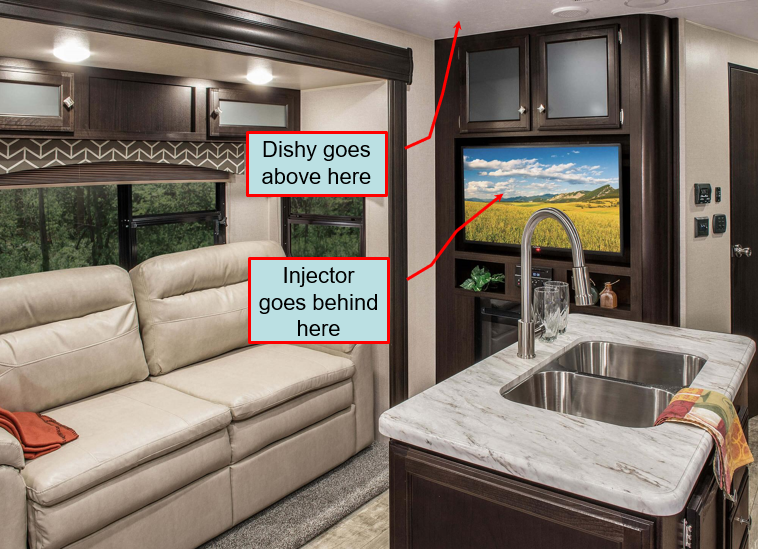
I happily spent a few days installing a Starlink Mini “Dishy” atop the trailer and the supporting system stuff inside behind the TV in the entertainment center. That was the super easy part. What I really wanted was a strong, reliable Wi-Fi signal in the campground AND in the cab of the pickup while we were on the road, and that would require the Dishy to be powered “ALWAYS ON” using a reliable 12V power source. That part took a little more thought and planning, but there is a lot of information from others about this on that InterWeb thing, so I got to work and sketched out all the stuff I would need.
First, to cut through all the gab, here’s a summary of my needs and requirements.
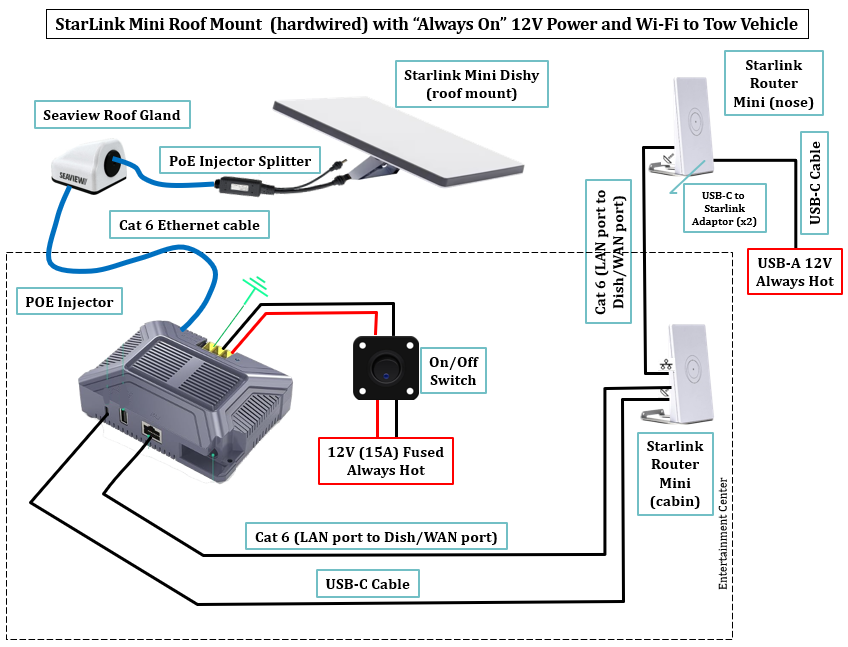
And here’s the schematic that I initially thought would be needed to implement it.
Our trailer has an entertainment center located centrally, which helped to determine where we would mount the Starlink Dishy, and I’m thankful that it’s forward of the A/C too.
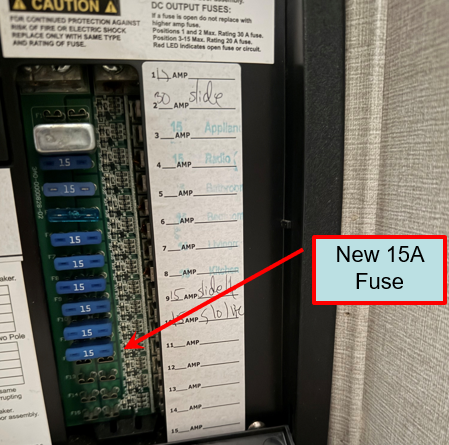
Thank God the current generation of Starlink Mini and Router Mini support 3 features that make my desire for “always on” possible: PoE (Power over Ethernet), which lets me push power up to Dishy through its ethernet cat 6 cable, 12V power input (for mobile installations), and automatic mesh networking, either hardwired or over Wi-Fi when you use 100% Starlink Router Mini’s. That promised to save me a ton of wiring, which in my trailer is usually the thing that defeats me. I chose a 12V PoE Injector for the base of my configuration, which required at least 80 watts of 12V DC input power. This required me to run a dedicated power line from my 12V fuse panel, so I installed a new circuit with a 15A fuse and 14 gauge wiring, which I painstakingly snaked under the bathroom and shower and into the back of the entertainment center. This gives me a very stable 180W of 12V power, more than enough to power Dishy and at least one Router Mini powered off of the injector. The injector also has 2 integrated USB ports, one A type and one C type, so I can power a Router Mini with “always on” 12V (USB A).
What wasn’t clear from the online information was just how strong of a signal I could get out of Dishy, which has a built in router. I assumed from the compact size of the antenna that it might not be too great, so I expected I would need to extend it into a small scale mesh network that I could install inside the rig, with one router antenna placed far enough forward and unobstructed enough to reach the cab of the pickup. My first thought was to place it on the roof under my forward vent cover, but routing reliable 12V power and an ethernet cat 6 cable to that location was a nightmare. Then I thought to put it in the nose of the cabin in a closet that had only thin plywood and fiberglass between it and the pickup cab. Those 2 things won’t block a Wi-Fi signal enough that it won’t reach the 15 feet or so get to us up front.
I bought all the stuff I need mostly from Amazon with the exception of buying the Starlink Mini, roof mount and first Router Mini direct from Starlink. Be prepared to wait at least a week for delivery, Amazon it ain’t.
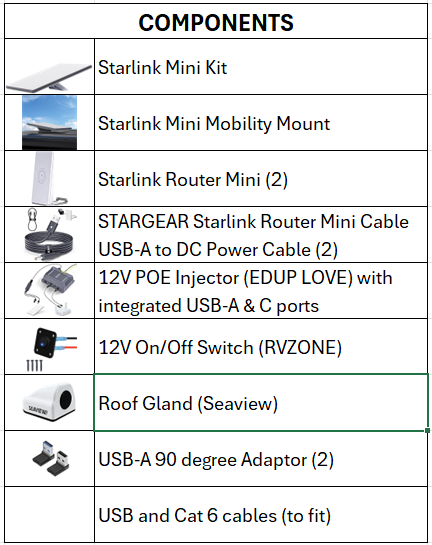
I assembled everything in the garage, wired up the way my schematic showed, and powered by a spare RV battery I keep and some cigarette lighter USB outlets (Dishy had to go outside to the driveway for some open sky). I was quite happy with the result, so I disconnected both Router Mini’s and did a range test on the Dishy router’s signal. I got well over 100’ away before it dropped from full strength to down one bar. This was good, and it encouraged me to “soft install” this gear into the rig with power coming from a 12V hot wire for the entertainment system. That’s when I realized I absolutely needed a dedicated 15A line from the fuse panel, so I worked on that first. The soft install, because Dishy was now 11 feet higher off the ground, gave me a strong Wi-Fi signal almost 150’ in radius, way more than I needed to get Wi-Fi in the truck cab while mobile. After that test it got quite easy to position Dishy on the roof, far enough from the air conditioner and slightly behind my bathroom skylight so it would be somewhat protected from highway wind.
I drilled a 5/8” hole through the roof and ran the ethernet cable down to the entertainment center. If I were to do this again, I would look at the roof gland and drill the biggest hole I could, that small size was enough to clear the ethernet connector, but it made it difficult to route the cable. Once that was done, and the Dishy mounted (Starlink Mini Mobility Mount) with some RV roof sealant beneath it, and the roof gland was sealed and installed, the rest of the work inside the rig came down to running wires and fastening everything to the wall behind the TV. It powered up on the first try.
Our Wi-Fi is active from the moment I switch on the battery disconnect to the moment I switch it off at the end of the trip. It’s faster than my T-Mobile 5G internet at home, often getting 250+ MBPS download and 30+ MBPS upload.
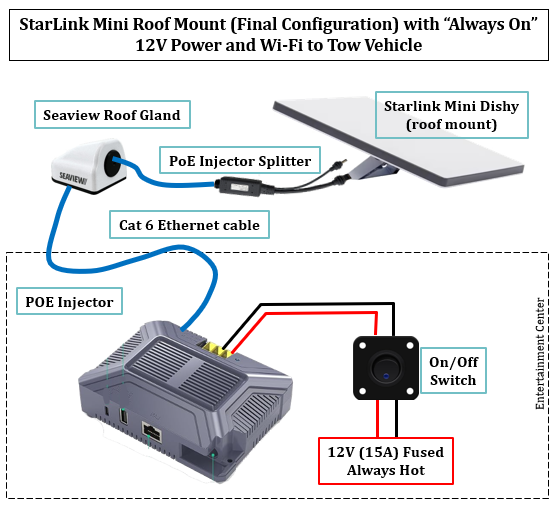
Here’s the final schematic, much simpler and cheaper.
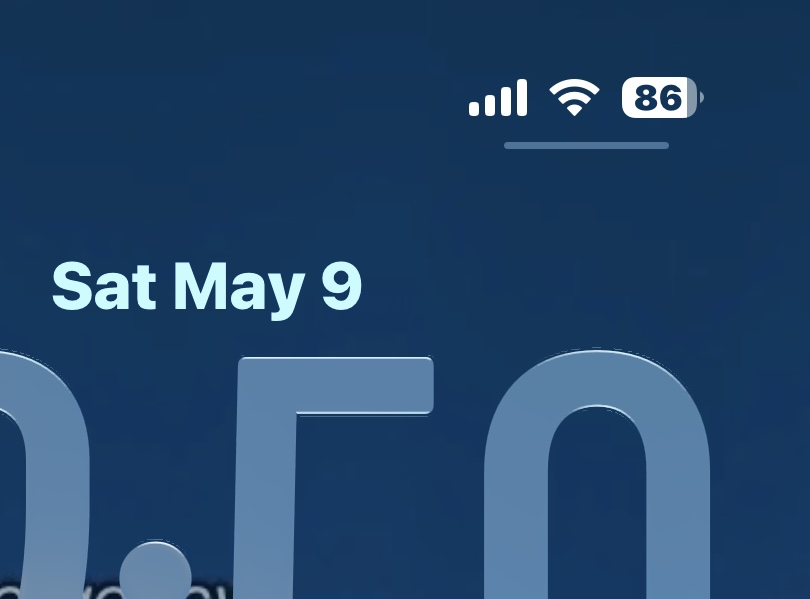
And here’s the Wi-Fi signal strength I get in the truck cab while driving:
I didn’t install the (2) Router Mini’s I bought because I got such a great signal from the integrated router on Dishy, my TV runs awesome on that signal and my iPhone loves it too. But since the injector has integrated LAN and USB-A ports, I kept one Router Mini, a USB-A to Starlink Mini power cord, and a short cat 6 cable in the rig so I could very quickly add a mesh node inside the rig if needed. The other Router Mini, the one I bought from Amazon, went back for a refund to our account. I suspect Wendy will employ some Girl Math to turn that into something we got “for free”.
I have to admit, I added one change to my requirements list for a campsite because of Starlink. While I used to prize shade wherever I could get it, I have now become tree (and therefore shade) intolerant. Let the sun shine!
Don’t forget to scribble your email in the box up top to subscribe! It’s free and so totally worth it.
Tippy thinks he knows a thing or two, or three…..


Awesome. We have the Starlink setup here as we were limited on wifi. Works great. ENJOY